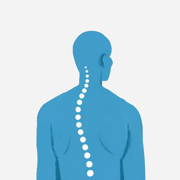
Good sitting posture: the seven contact points of a correct desk sit
Good sitting posture is seven things at once: feet flat, knees near 90°, hips slightly above the knees, lumbar spine touching the backrest, elbows at 90–120°, shoulders unshrugged, and the top of the screen at eye level. None of it should be held rigidly. Change position every 20 to 30 minutes.
The seven contact points of good sitting posture
Work bottom-up. Everything above the pelvis inherits whatever the pelvis is doing, so a seat set correctly often resolves complaints people go looking to fix at the neck.
| Contact point | Target | Common error |
|---|---|---|
| Feet | Flat on the floor or a footrest | Tucked under the chair, crossed, or dangling |
| Knees | 90–110° bend; two to three finger widths behind the knee | Seat pan too deep, edge pressing the calf |
| Hips | Level with or slightly above the knees; trunk–thigh angle 95–110° | Pelvis rolled back, weight on the tailbone |
| Lumbar | Inward curve of the low back on the backrest, at belt height | A hand-width gap behind the low back |
| Elbows | 90–120°, upper arms near the ribs, forearms level with the keyboard | Reaching forward to a distant keyboard |
| Shoulders | Down and relaxed, ear stacked over the shoulder | Shrugged up by armrests set too high |
| Gaze | Top of screen at or just below eye level, about an arm's length away (20–30 in / 50–75 cm) | Laptop flat on the desk, neck flexed |
Feet, knees, and hips
Chair height comes first — measure it from the floor, not the desk. Lower the seat until your feet rest flat with the thighs roughly parallel to the ground or the knees a touch below the hips. Dangling feet matter: with nothing to push against, the pelvis rolls backward, the lumbar curve flattens, and every joint above it compensates.
Check seat depth next: two to three finger widths between the front edge of the seat and the back of your knee. A pan that's too deep forces a choice between losing backrest contact and letting the edge press into your calves, and most people choose the first.
The hip angle is where the classic diagram misleads. Ninety degrees is a drawing convention, not a target. Most people hold a neutral spine more easily between 95 and 110°, which is why office chairs recline and why some seat pans tilt forward.
Lumbar contact and the backrest
This is the point most desk setups miss. The chair's lumbar prominence should meet the inward curve of your low back at about belt height — not up between the shoulder blades, not down on the sacrum. Sit all the way back, then set lumbar height, then set recline; the other order guarantees a second pass.
Two failure modes matter: perching on the front third of the seat with a foot of air behind you, or the opposite — an aggressive lumbar pad holding the low back in a permanent arch that's as fatiguing as slumping.
Elbows and shoulders
Set the keyboard to your seated elbow height rather than adjusting yourself to the desk. Elbows land at 90–120° with the upper arms hanging near the ribs. Keep the mouse on the same plane and within the same arc as the keyboard; reaching forward for it is a common source of neck and shoulder discomfort. Armrests should carry your forearms without lifting your shoulders — if they shrug you even slightly, drop them or take them off.
Gaze line
Top of the screen at or just below eye level, roughly an arm's length away. A laptop flat on a desk makes this impossible: screen and keyboard are attached, so one of them is always wrong. A riser plus an external keyboard fixes it for a fraction of the cost of a new chair. People with progressive or bifocal lenses usually need the monitor lower than this advice, since the lower lens segment otherwise forces the head back all day.
How to sit at a desk correctly when the desk is the wrong height
Most fixed desks sit around 29–30 inches (73–76 cm), a writing height that suits a fairly narrow slice of adults. If you're shorter than that slice, the desk dictates your elbow height, the chair rises to meet it, and your feet leave the floor. Raise the chair until the elbows are right, then add a footrest — a stack of reams works. A keyboard tray beneath the desk buys back an inch or two if the surface is still too high.
A desk that's too low is rarer and easier — put it on risers rather than dropping the chair too low. Sit-stand desks sidestep the argument, but only if you actually change the height; a standing desk left at one setting is just a desk.
The best sitting posture for lower back pain
The common complaint here is that sitting up straight makes things worse, which is real and not a failure of willpower. Clinicians generally describe two broad patterns: some people feel worse with sustained flexion — slumping, soft low seats, long drives — and some feel worse with sustained extension, meaning a rigidly upright sit with an aggressive lumbar pad. The same chair needs opposite adjustments for the two.
Reasonable starting points when upright sitting aggravates things: recline the backrest to roughly 100–110° so the chair carries more of the load, keep firm lumbar contact rather than deepening the arch, and cut continuous sitting time. A wedge cushion or forward seat tilt suits people uncomfortable in flexion.
None of that is a diagnosis. Pain that persists, worsens, radiates below the knee, comes with numbness or weakness, or wakes you at night deserves a physical therapist or physician rather than another chair adjustment.
The rigid-upright myth
Chest lifted, chin pinned back, lumbar maximally arched — that's a position for standing at attention for two minutes, not a workday. Holding it takes continuous work from the spinal extensors and abdominals; those muscles fatigue, and the usual result is a heavier slump than the moderate position you abandoned would have produced. Correct posture for sitting at a desk is a range you move inside of, not a shape you lock into — a distinction that matters more than any single angle when you're trying to fix bad posture.
Dynamic sitting: changing position beats holding one
Time in a single posture matters at least as much as which posture it is. The practical version of proper sitting posture at a desk is three or four positions you rotate through — upright for typing, reclined for reading and calls, a brief forward perch for close work — plus regularly leaving the chair. One widely circulated office cadence is roughly 20 minutes seated, 8 standing, 2 moving; the exact split matters far less than not letting any one stretch run long.
The obstacle is that the body stops noticing drift. Sitting still dulls the positional feedback that would otherwise tell you you've slid forward, so slumping never registers as a change — which is exactly where an external prompt beats intention. Posture Reminder is a posture reminder app for iPhone and Apple Watch, built for that gap between when you drift and when you notice.

FAQ
What is the correct sitting posture at a desk?
Feet flat and supported, knees bent 90–110° with a small gap behind them, hips level with or slightly above the knees, low back touching the backrest at belt height, elbows at 90–120° with shoulders relaxed, and the top of the screen at or just below eye level. Set it bottom-up, starting with chair height.
Is a 90-degree hip angle actually correct?
Not as a fixed rule. Most people hold a neutral low back more comfortably at 95–110°, which is why nearly every task chair reclines. Treat 90° as the low end of a usable range rather than the target.
How often should I change position while sitting?
Every 20 to 30 minutes is the usual recommendation, and it doesn't require standing up every time — shifting between upright and reclined, or adjusting the backrest, counts. Getting fully out of the chair once or twice an hour is a reasonable addition.
Why does my back hurt more when I sit up straight?
Often because "up straight" is being held as an over-arched, braced position rather than a supported one. Letting the backrest take the load at around 100–110° with firm lumbar contact feels different from bracing upright at 90°. Persistent or worsening pain is worth having assessed by a professional.
Does a lumbar cushion help desk posture?
It can, when the chair has no lumbar support or the support sits at the wrong height. Position it at belt level and use the smallest one that maintains contact — a cushion thick enough to force an exaggerated arch trades one uncomfortable extreme for another.
Free Posture Reminder tools
- Anterior Pelvic Tilt TestThis anterior pelvic tilt test turns standing side-view observations into a simple posture score and neutral-position cues. It is a non-diagnostic screen, not a clinical assessment.
- Desk Chair Height CalculatorEstimate a desk chair height range from your height and desk height, then check whether your current chair supports a workable seated posture.
- Forward Head Posture CheckerUse a side-profile photo to estimate your craniovertebral angle with two clicks. This posture checker is a rough self-check, not a diagnosis.
- Monitor Height Ergonomics CalculatorEnter your seated eye height, monitor height, screen height and viewing distance to compare your setup with monitor height ergonomics targets.
- Posture Assessment ScoreAnswer a few desk posture questions, add your seated minutes and breaks, and get a non-diagnostic score with the highest-impact setup habits to review.
- Proper Sitting Posture at Desk CheckerCompare your desk, chair and monitor dimensions with height-scaled targets for a practical 90-90-90 sitting setup.
- Standing Desk Converter PlannerPlan a conversion standing desk setup from your body height, current desk, monitors and laptop. Get the converter lift, minimum surface width and estimated load.
- Standing Desk Height CalculatorEstimate a comfortable starting height for your standing desk, monitor, chair and screen viewing distance. Enter your body height and shoe heel height in centimetres or inches.
- Standing Desk TimerSet a sit/stand pattern and work-block length, then follow a live countdown with the next switch time, full schedule and sitting and standing totals.
- Wall Test Posture CheckUse a wall test for posture to record four contact findings and two gap measurements. Get a rough posture score, plain-language suggestions and the finding to address first.
- Workspace Ergonomics CalculatorUse an ergonomics calculator to set a desk or keyboard height, seat height, monitor top and viewing distance for seated or standing work.